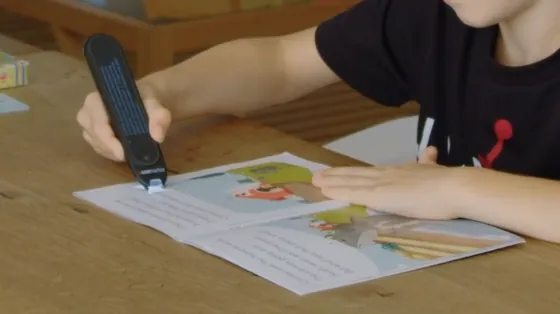
In an era saturated with smartphones and tablets, the simplest technology is often the most transformative. A dedicated text-to-speech pen eliminates screens, pairing apps, and digital distractions entirely.
When you glide the optical tip of a text-to-speech pen across a physical page—whether a paperback novel, a dense university syllabus, a medical bill, or a printed workplace memo—an internal optical sensor captures the text and immediately articulates the words aloud through a built-in speaker or headphones.
There is no camera to frame, no phone to unlock, no cloud upload delay, and no barrage of social media notifications breaking your focus. For adults suffering from chronic reading fatigue, individuals with low vision, students with dyslexia or ADHD, and English Language Learners (ELL), this immediate tactile bridge between physical print and natural audio restores complete reading autonomy.
Below is our comprehensive 2026 guide to how text-to-speech pens work, who benefits most, and how the top standalone models compare.
2026 Master Comparison: The Best Standalone Text-to-Speech Pens
Unlike connected scanning pens (which have no speakers and only type into a computer), these devices are 100% standalone—they process and speak text completely on-device:
| Model | Price | Display Interface | Offline Languages | Audio Output Options | Key Distinctive Feature |
|---|---|---|---|---|---|
| Scanmarker Max | $299 | 2.4" Color Touchscreen | 30 Languages (Offline TTS) | Speaker, 3.5mm Jack & Bluetooth | Touchscreen tracking, dictionary definitions, exam-lock mode |
| Scanmarker Max Bundle | $319 | 2.4" Color Touchscreen | 30 Languages (Offline TTS) | Speaker, 3.5mm Jack & Bluetooth | Includes interactive phonics flash cards for structured literacy |
| Scanmarker PAL | $179 | 1.9" High-Contrast LCD | 10 Languages (Offline TTS) | Built-in Speaker + 3.5mm Jack | Single-touch simplicity, screen-free focus, lower price |
| C-Pen Reader 2 | ~$299 | Monochrome OLED | English, Spanish, French | Built-in Speaker + 3.5mm Jack | Cambridge Dictionary integration & voice memo recorder |
| OrCam Read 3 | ~$1,700+ | None (Laser targeting) | Multiple online languages | Speaker & Bluetooth | Full-page capture for severe visual impairment (high-end medical tier) |
How Voice Synthesis Works: From Printed Ink to Natural Audio
Modern text-to-speech pens do not sound like the mechanical, robotic computer voices of the 1990s. They utilize advanced embedded acoustic synthesizers:
[Printed Page] ➔ [Optical Camera Capture] ➔ [Neural OCR Binarization]
                                                        ↓
[Speech Output] ⇦ [Phoneme Synthesis] ⇦ [Grapheme-to-Phoneme Parsing]
- Grapheme-to-Phoneme Conversion: The embedded optical character recognition (OCR) engine converts character shapes into machine text. The linguistic engine then parses the text into phonemic representations, taking into account irregular English pronunciations (e.g., distinguishing the noun "record" from the verb "to record").
- Natural Prosody & Punctuation Cadence: The speech engine analyzes punctuation marks. It inserts natural micro-pauses at commas, drops vocal pitch at periods, and raises pitch at question marks, maintaining the natural cadence of human speech.
- Pacing Control: Users can customize playback speed (from 0.5x slow-motion up to 2.0x high-speed audio), allowing struggling readers to dissect complex vocabulary or auditory power-readers to absorb information quickly.
Who Benefits Most from a Text-to-Speech Pen?
1. Adults Managing Reading Fatigue & Eye Strain
Staring at illuminated computer monitors for 8 to 10 hours daily leaves millions of knowledge workers suffering from computer vision syndrome (CVS), chronic headaches, and ocular fatigue. A text-to-speech pen allows adults to review printed reports, industry journals, and books without visual strain, letting their ears do the work while resting their eyes.
2. Neurodiverse Learners & Individuals with ADHD
For individuals with Attention Deficit Hyperactivity Disorder (ADHD), silent reading often invites cognitive drift; the eyes scan words across the page while the brain wanders to unrelated thoughts. Text-to-speech audio acts as an auditory metronome, anchoring focus to the text line and dramatically improving task persistence and reading retention.
3. Dyslexic Readers & Orton-Gillingham Literacy Plans
As recognized by the International Dyslexia Association (IDA), auditory accommodations allow dyslexic learners to access grade-level intellectual material without being restricted by their mechanical decoding bottlenecks. Experiencing printed glyphs and spoken phonemes simultaneously strengthens neurological neural pathways (multisensory learning).
4. English Language Learners (ELL) & Multilingual Households
Mastering a second language requires connecting the written word with correct phonetic pronunciation. With models like the Scanmarker Max, an ELL student or immigrant professional can sweep the pen across an English book, hear native pronunciation, view the word definition, and instantly translate the passage into their native language offline.
5. Seniors & Low Vision Individuals
For seniors managing macular degeneration, mild cataracts, or diabetic retinopathy, reading prescription medicine bottles, grocery packaging, utility bills, and personal mail can become frustrating. A handheld text-to-speech pen provides instant, dignified access to daily print without requiring bulky desktop magnifying cameras.
Audio Ergonomics: Private Listening vs. Room Amplification
Using an assistive reading device in public spaces (school libraries, open-plan offices, public transit) requires audio discretion:
- Built-in Speakers: Ideal for private home study, one-on-one speech therapy sessions, or quiet bedrooms.
- Standard 3.5mm Headphone Jack: Present on all Scanmarker standalone models and C-Pen devices, allowing users to plug in standard wired school earbuds without Bluetooth battery worries.
- Wireless Bluetooth Audio: Available on the Scanmarker Max, allowing seamless pairing with Apple AirPods, noise-canceling headphones, or classroom FM assistive listening systems.
The Standalone Guarantee: True Offline Privacy
In institutional settings, data security is paramount. Many parents and school administrators are hesitant to adopt assistive apps that upload student photos to cloud servers.
- The Scanmarker Max and Scanmarker PAL contain zero Wi-Fi antennas, zero cellular radios, and zero cloud tracking.
- Character recognition, phonetic dictionary lookups, and voice synthesis happen entirely within the physical silicon of the pen.
- The devices are 100% compliant with student privacy laws (FERPA, COPPA) and clinical healthcare regulations (HIPAA).
Frequently Asked Questions
Does a text-to-speech pen need to be connected to a smartphone or computer?
No. Standalone models like the Scanmarker Max, Scanmarker PAL, and C-Pen Reader 2 are completely self-contained. They feature their own optical cameras, microprocessors, audio speakers, and rechargeable batteries. You can use them outdoors, in classrooms, or on airplanes with no phone or internet connection.
Can a text-to-speech pen translate what it reads into other languages?
Yes. The Scanmarker Max translates scanned text across 30 languages completely offline, displaying the translation on its color touchscreen and articulating the translated speech through its speaker. Connected models (like Scanmarker Air) translate across 100+ languages when paired with the companion application.
Can I adjust the reading voice and playback speed?
Yes. In the device settings, you can adjust the speech playback speed from slow (for young readers and pronunciation practice) to fast (for rapid review). You can also switch between male and female synthetic voice profiles.
Will a text-to-speech pen read handwritten notes or cursive?
No. Text-to-speech reading pens are engineered specifically for machine-printed typography (standard fonts found in books, magazines, worksheets, and printed office documents). Handwriting recognition is not supported due to high variability in human penmanship.
How long does the battery last on a standalone read-aloud pen?
The Scanmarker Max provides approximately 5 to 6 hours of continuous scanning and audio playback, which easily covers a full school day or extensive study session. It recharges via standard USB-C in approximately 90 minutes.
Can you use headphones with a text-to-speech pen?
Yes. The Scanmarker Max, PAL, and C-Pen devices include a standard 3.5mm headphone jack. The Scanmarker Max also supports wireless Bluetooth connectivity, allowing you to pair wireless earbuds or noise-canceling headphones for quiet reading in public libraries or study halls.
Reviewed by
Dr. Marcus Vance, CCC-SLPSpeech-Language Pathologist & Assistive Technology Consultant
Dr. Marcus Vance specializes in pediatric and adult speech-language pathology, auditory language processing, and assistive voice synthesis technologies.
Tagged
- text to speech
- assistive tech
- read aloud
- reading pens
- accessibility
See the full solution
Scanmarker for Dyslexia & Reading Support
Need a pen for homework tonight — or a district quote?