If your child has a reading difficulty — dyslexia, ADHD, a language learning gap, or some combination — someone has probably already pointed you toward Microsoft Immersive Reader. It's free, it's built into Word and Teams and OneNote and the Edge browser, and it does a genuinely good job of making digital text easier to read.
Then you look at the price of a reading pen ($179–$299) and the question writes itself: why would I buy this if I already have something free that works?
It's a fair question, and the honest answer isn't "you definitely need the pen." Sometimes you don't. But understanding exactly where each tool hits its limits is the only way to know which situation you're in — so this is the guide that actually tells you.
The Short Answer (If You're in a Hurry)
Immersive Reader works on digital text — anything on a screen. It cannot read a physical book, a printed worksheet, or a paper exam.
A reading pen works on physical printed text — anything on paper. It cannot read a website or a document on a screen.
Most children who need reading support with both printed and digital materials end up using both. They're complementary tools solving different halves of the same problem, not competitors for the same job.
If your child works entirely digitally and never touches printed paper, start with Immersive Reader. It costs nothing and may be all they need.
If your child regularly encounters physical books, printed worksheets, textbooks, or paper tests — especially for standardized testing — a reading pen covers ground that no free software can.
What Immersive Reader Does Really Well
Digital Text Is Its Home Territory
Immersive Reader lives inside the Microsoft ecosystem — Word, OneNote, Outlook, Teams, Edge, and the OneNote web clipper. Within that ecosystem, it's excellent. It reads the text aloud with clear, natural-sounding voices, highlights words as it goes, and adjusts reading speed on the fly.
For a child doing homework in Word, reading an article in Edge, or following a class discussion in Teams, Immersive Reader removes the reading barrier without any additional device, any extra cost, or any setup beyond a Microsoft account.
Customization That No Pen Can Match
This is where Immersive Reader genuinely outpaces a reading pen: visual customization. It can:
- Increase font size and adjust letter spacing (reduces visual crowding — significant for some dyslexic readers)
- Change the page background color (white-on-black or pastel backgrounds for readers with visual stress)
- Break words into syllables with visual syllable highlighting
- Highlight parts of speech in different colors
- Isolate a single line at a time with a "line focus" feature
A reading pen converts printed text to audio. It doesn't change how the text looks on the page. If a child's difficulty is as much about visual processing as auditory comprehension, Immersive Reader's visual tools add something no pen provides.
The Price Is Hard to Beat: Free
Built into the Microsoft 365 ecosystem at no additional cost. For families, it costs nothing beyond whatever device is already being used for schoolwork. For schools, it's already licensed as part of the Microsoft Education subscription most districts use. There is no hardware to break, charge, or lose.
Where Immersive Reader Hits a Wall
It Cannot Read a Physical Page
This is the hard limit — and it's not a software shortcoming that a future update will fix. Immersive Reader is software that reads text already on a screen. A physical textbook sitting on a desk, a printed worksheet handed out in class, a paper-based novel assigned for reading homework — none of these exist as digital text. Immersive Reader cannot see them.
The workaround is digitizing the physical text first — scanning a page with a phone camera, using an OCR app, photographing the worksheet. That chain of steps works in theory. In practice, asking a child who is already struggling with reading to also manage a multi-step digitization process before they can even start reading is asking a lot. It reliably doesn't happen consistently.
A reading pen eliminates that chain entirely. You drag it across the line. It reads the line. That's it.
Exams — The Hard No
State standardized tests, district assessments, college entrance exams, and AP exams almost universally prohibit internet-connected devices and software applications. Immersive Reader requires a device, an internet connection (for full functionality), and runs on a general-purpose computer or phone — which typically means it cannot be in a testing room at all.
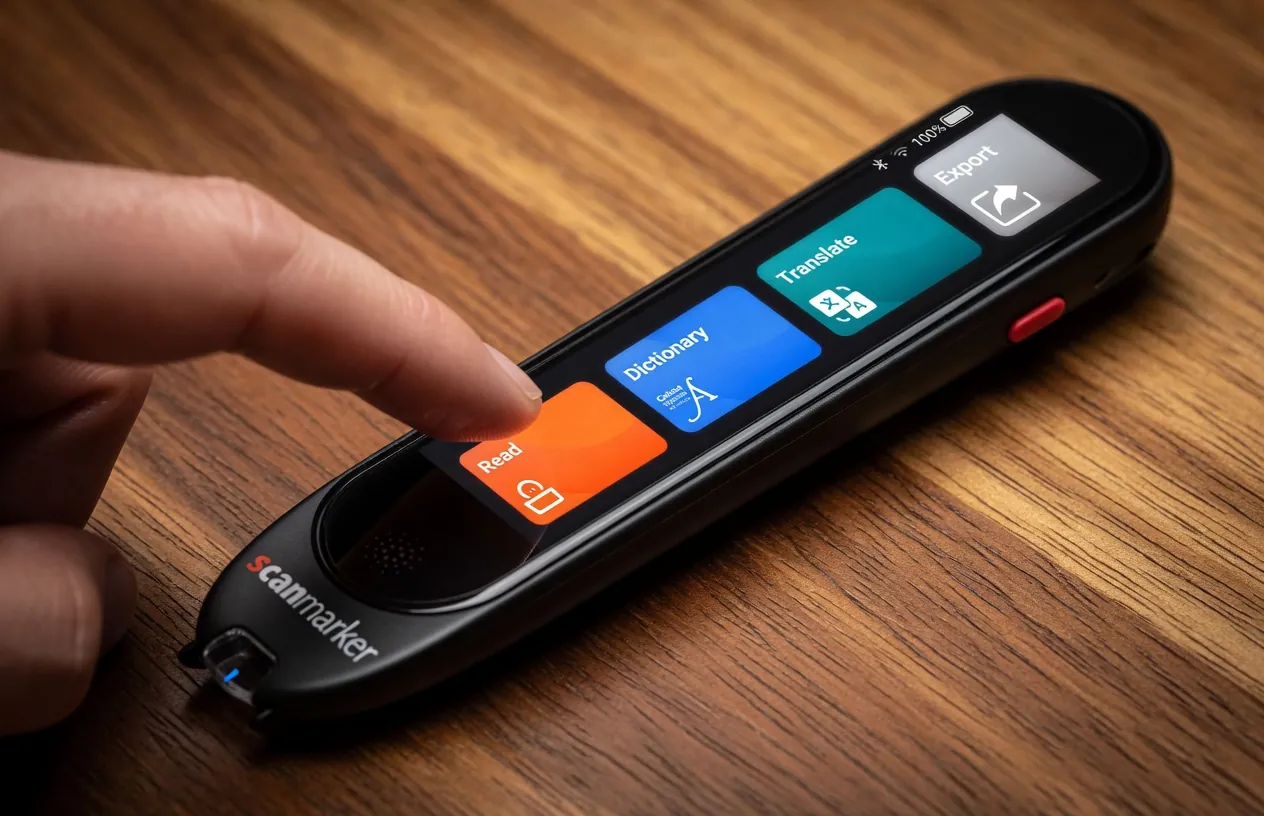
A reading pen — particularly an exam-locked model like the Scanmarker Max, which disables Wi-Fi and translation for testing — is specifically designed to meet the accommodation requirements of formal testing environments. Many exam authorities accept standalone, offline reading pens as a legitimate read-aloud accommodation. Software running on a connected device is a much harder sell to testing authorities, and in many cases is simply not permitted.
If your child's reading accommodation needs to carry through to standardized testing, this single factor often resolves the question.
The Phone Problem: One Tap from Distraction
This applies especially to children with ADHD, but it's relevant for many readers. Immersive Reader runs on the same device that has games, YouTube, texts, and every app a child has ever downloaded. Staying in the reading tool and not in the distraction requires active self-regulation — exactly the skill that ADHD undermines.
A reading pen is a single-purpose device. It has no app store, no notifications, no social media access, and no browser. The distraction temptation doesn't exist because the distraction options don't exist.
What a Reading Pen Does That Software Can't
Any Printed Surface, Instantly
Physical book. Printed worksheet. Photocopied handout. Paperback novel from the school library. Printed map in a geography class. A label on a bottle. A menu at a restaurant.
Any surface with printed text in a standard font can be scanned. The text is read aloud in under a second. No internet connection, no OCR app, no chain of digitization steps.
Standalone = No Device, No Wi-Fi, No Temptation
The Scanmarker Max and Scanmarker PAL work with no phone, no laptop, and no internet connection. They are self-contained reading tools. This matters in three contexts where Immersive Reader simply doesn't apply: exam rooms, low-connectivity environments (rural schools, fieldwork, travel), and situations where a phone or computer shouldn't be present.
Exam-Approved Read-Aloud Support
The Scanmarker Max's exam-lock mode disables Wi-Fi and translation, producing a device profile that many testing authorities accept as a read-aloud accommodation for IEP/504 students. This is the feature you cannot replicate with software — an offline, single-function state that satisfies exam room rules.
Always confirm your specific exam authority's current policy before the test date. Policies change, vary by state, and differ between district tests, state assessments, and college entrance exams.
The Cases Where You Need Both
A middle schooler with dyslexia and an IEP read-aloud accommodation:
- Digital homework in Word → Immersive Reader
- Physical textbook assigned chapters → reading pen
- State standardized test with read-aloud accommodation → reading pen (exam-lock mode)
An ELL student in a mainstream classroom:
- Online reading assignments → Immersive Reader (or Chrome's read-aloud extension)
- Printed worksheets and physical readers → reading pen with translation enabled
- Paper-based vocabulary assessments → reading pen
An adult with dyslexia at work:
- Email, reports in Word, digital documents → Immersive Reader or screen reader
- Printed contracts, physical meeting materials, paper-based forms → reading pen
The Cases Where You Only Need One
You only need Immersive Reader if: your child's entire learning environment is digital — all assignments are submitted and read on-screen, no printed materials are used, and standardized testing with a read-aloud accommodation is not in the picture.
You only need a reading pen if: your child's learning environment is entirely print-based, they have no reliable access to a device for digital tools, or the exam accommodation need is the primary driver and software won't be permitted.
Most families land in the "both" category — especially once standardized testing enters the picture.
What Other Parents and Teachers Actually Do
The most common pattern we see from educators and families who've been using reading support tools for more than a year:
- Start with Immersive Reader because it's free and available immediately.
- Discover the printed material gap — usually when a physical textbook is assigned, or when a paper-based test comes up and the digital tool can't come into the room.
- Add a reading pen for the printed-material context.
The two tools don't compete. They occupy different parts of a child's day.
Frequently Asked Questions
Does Microsoft Immersive Reader work offline?
Partially. Some features work offline in desktop apps like Word, but the full feature set — including the picture dictionary, translation, and syllable breakdown — requires an internet connection. The Scanmarker Max and Scanmarker PAL work fully offline, including in exam rooms.
Can my child use Immersive Reader on a school-issued Chromebook?
Immersive Reader is primarily built into Microsoft products — it works natively in Edge, Word, Teams, and OneNote. On a Chromebook running Google Workspace (not Microsoft 365), availability depends on what the school has licensed. Your school's IT department is the right place to confirm what's actually accessible on the specific device.
My child's IEP already lists Immersive Reader. Can I also request a reading pen?
Yes. An IEP accommodation addresses a functional need — read-aloud for printed materials is a different functional need from read-aloud for digital materials, and one tool doesn't cover both. If the team agrees that your child regularly encounters printed material that Immersive Reader can't reach, a reading pen is a non-redundant, additional accommodation. See our IEP and 504 guide for how to document this.
Is a reading pen allowed in state standardized tests where Immersive Reader is not?
Many state testing programs permit approved, offline reading pens (especially exam-locked devices) as a read-aloud accommodation, while prohibiting internet-connected software or general-purpose devices entirely. Check your specific state's testing accommodation policy. The Scanmarker Max is designed with this use case in mind — its exam-lock mode disables internet access and translation to meet common testing requirements.
At what age should I introduce a reading pen versus starting with software?
There's no single rule, but a practical approach: start with Immersive Reader for any digital work at whatever age your child is using devices for school. Consider adding a reading pen when printed materials become a consistent barrier — typically in grades 2–3 when chapter books and printed worksheet volume increases, or earlier if the child is in a program with significant printed text.
Which Scanmarker model is closest to what Immersive Reader does for digital text?
For the broadest feature overlap — including translation and a built-in dictionary — the Scanmarker Pro is the most comparable: it pairs with a phone or computer, includes dictionary lookup, and handles translation across 100+ languages. For complete independence from any other device, the Scanmarker Max is the standalone equivalent. Compare all models here.
Our Recommendation
Start with Immersive Reader. It costs nothing, it's already available, and it covers digital text comprehensively.
Then look at where printed material shows up in your child's day. If it's a meaningful part of the learning environment — physical books, printed homework, paper tests — a reading pen covers the gap that software cannot. The two tools work side by side without overlapping.
If you're ready to compare reading pen options, our buyer's guide covers what to look for. If you're specifically navigating exam accommodations, the IEP and 504 guide covers the documentation side.
Related reading: Best Reading Pen for Dyslexia in 2026 · Reading Pens and ADHD: What Actually Helps · Who Pays for Reading Pens? IEP & 504 Guide
Tagged
- buyer's guide
- Microsoft Immersive Reader
- assistive technology
- dyslexia
- comparison
- free tools
See the full solution
Compare Scanmarker Products
Need a pen for homework tonight — or a district quote?